
Value Presets System
Available in Krakatoa v1.0.0 and higher
Introduction
- The [>>] buttons next to value spinners provide a system for user-defined presets:
- Either click or right-click the [>>] button to open the context menu.
- The first time the menu is opened after the initial installation of Krakatoa, the list will contain some typical factory default values. These values will be written to an INI file and can be removed later if desired (the only exception being the list of APME Ocean Presets which are hard-coded and cannot be removed).
- You can select a Preset from the list to set the value of the corresponding spinner.
Adding Values To The Presets List
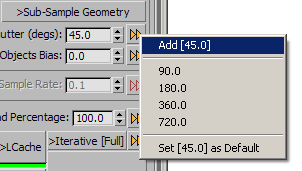
- To add a new value to the Presets, set it in the spinner, then click the presets button.
- If the value does not exist on the Presets list yet, an option “Add [X]” will be available, where X is the current value.
- Select this option and the value will be added to the Presets list.
- The presets are stored in your local settings folder in the file “KrakatoaPreferences.ini”.
- You can navigate easily to this file by going to the Presets and History rollout of Krakatoa and pressing the Explore Folder… button.
Removing Values From the Presets List
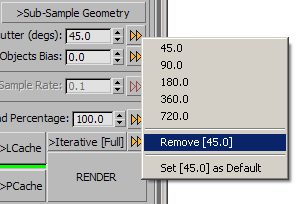
- To remove an existing value from the presets,
- Set the spinner to that value using the Presets list as described above or
- Enter the value manually
- Then select “Remove [X]” where X is the value to be removed.
- If the current value is not on the Presets list, the Remove option will not be available.
Setting Values As User Startup Defaults
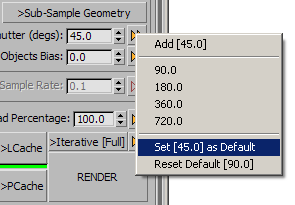
- The same menu provides options to set values as startup defaults.
- If the value does not have a User Default stored in the file KrakatoaDefaults.ini, the menu will show an entry “Set [X] as Default”. Selecting this option will store the current value as a User Default on disk. Next time a new instance of Krakatoa is added to a Max scene, this value will be used on startup to initialize the renderer.
- If the value does exist in the file KrakatoaDefaults.ini and its value is the SAME as the current value, the option “Reset Default [X]” will appear, allowing you to remove the entry from the User Defaults and use the Factory Defaults when initializing new instances of Krakatoa.
- If the value does exist in the file KrakatoaDefaults.ini and its value is different from the current one, the option “Set [X] as Default” will also be displayed. Selecting it will replace the existing value listed by the “Reset Default [Y]”.
Special Cases
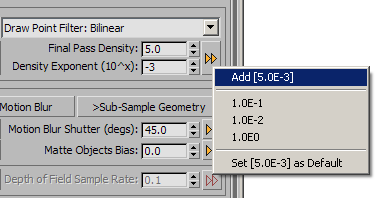
- The Particle Density spinners define a single density value in scientific format (Density*10^Exponent), so the [>>] Preset buttons set both values with a single click. The entries will have the format 5.0E-1 to denote Density of 5.0 and Exponent of -1.
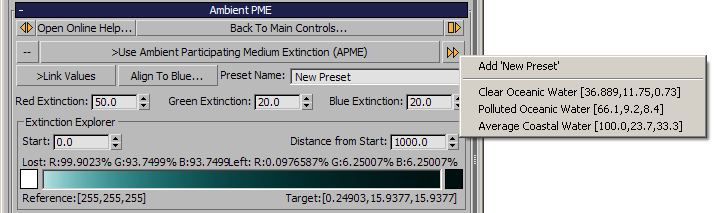
- The Ambient Participating Medium Extinction rollout provides a Presets button which sets three spinners at once (the Red, Green and Blue extinction).
- The default Ocean presets are hard-coded and cannot be edited/removed.
- New entries can be added with a custom name (all other Presets use the Value as Name in the list).
